Posts

Showing posts with the label Digital Imaging & Visualisation

DIV - Final Compilation and Reflection

Image
DIGITAL IMAGING & VISUALISATION - Final Compilation and Reflection 4 December, 2017  Jesslyn Fabryando  (0332213) Digital Imaging & Visualisation  Final Compilation Instructions Exercises - Color Restoration Exercises - Photo Montage Exercises - Surrealism Exercises - Wrapping Object with Displacement map Exercises - Introduction to further different tools Exercises - Introduction to After Effect Exercises - Further activity in After Effect Project 1 - Surrealism Final Project - Motion Poster Submissions: Google Drive link to all the files:  https://drive.google.com/open?id=1_mqC1KgSpxf42eI0vSoBhg8PybEa9TLe Exercises Exercise 1 (Week 1) - Color Restoration Fig 1. Color Restoration exercise done in class Fig 1.1. Color Restoration assignment done at home Exercise 2 (Week 3) - Photo Montage Fig 2. Photo montage of a bird + hand Exercise 3 (Week 4 - Week 5) - Surrealism Fig 3. Surrealism exercise Exerc...

Week 11 - Week 14 (Final Project) - Motion Poster/ Cinemagraph

Image
DIGITAL IMAGING AND VISUALISATION - Final Project: Motion Poster - Cinemagraph  Lecture/ Tutorial 9 & 11: Surrealistic November 14, 2017 - December 5, 2017 (Week 11 - Week 14) Jesslyn Fabryando - 0332213 Digital Imaging & Visualisation On the eleventh week, we are starting our Final project which is making Motion Poster - Cinemagraph. We were asked to make a poster of our own and animate it. Example of cinema graph:  https://www.youtube.com/watch?v=HOqt8NDZHgI  References examples (Transitions): https://www.youtube.com/watch?v=ZgkuswqKKpI https://www.youtube.com/watch?v=HOqt8NDZHgI https://www.youtube.com/watch?v=NBqAwAJqess https://www.youtube.com/watch?v=soVZ_MthMAI https://www.youtube.com/watch?v=LNFOVWLdnRU Making my own poster, I came up with a poster that is minimalistic. Fig. 1. Reference of my poster design Fig. 2. I created the person that is tied with a rope in Illustrator Fig. 3. I created the net in Illustrator ...

Week 9 - Week 11 (Project 1: Part 2) - Surrealistic

Image
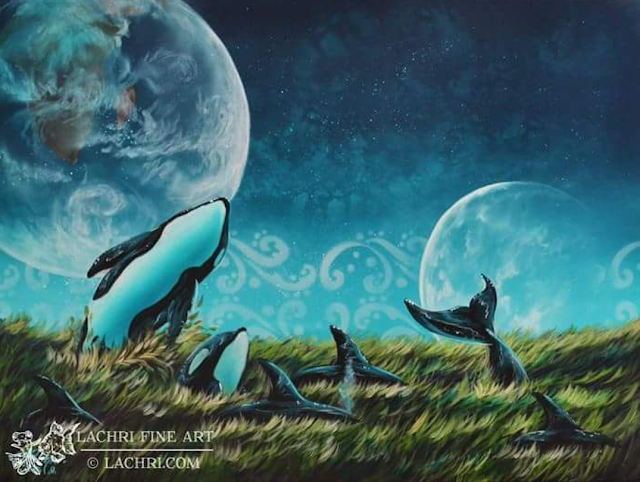
DIGITAL IMAGING AND VISUALISATION - Project 1: Part 2 - Surrealistic   Lecture/ Tutorial 9 & 11: Surrealistic October 30, 2017 - November 13,, 2017 (Week 9 - Week 11) Jesslyn Fabryando - 0332213 Digital Imaging & Visualisation On the ninth week, we are starting our project 1: part 2 of making surrealistic image. This time we are using our own images to create it Furthermore we will animate it zoom in/ zoom out and a little bit of movement. The software that we will be using is Adobe Photoshop for editing, Adobe After Effect for animating using puppet pin tool as well as the transform setting by adjusting the position and the scale. The submission should be in GIF and can be sent to WhatsApp therefor the file should be compressed not exceeding 65MB because WhatsApp cannot accept beyond 65MB. Mr. Hafiz told us to have the references base on a painting so that it will be easier. Below is my Surrealistic painting references by Lisa Lachri. Fig.1.  Sur...

Week 9 (Exercises) - Further Activity in Adobe After Effects

Image
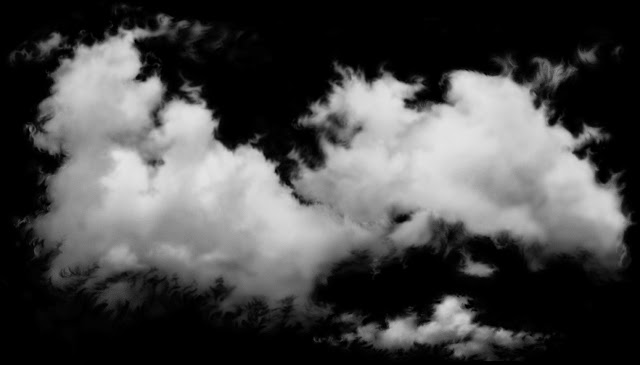
DIGITAL IMAGING AND VISUALISATION - EXERCISES Lecture/ Tutorial 9:  Introduction to Adobe After Effects October 30, 2017 - Week 9 Jesslyn Fabryando - 0332213 Digital Imaging & Visualisation Further Activity in Adobe After Effects (Exercises) Practical 9:  Looping and Animating small movement in Adobe After Effects On week nine, we were learning about animating certain image with a very light movement. Aside from that we learn how to loop the animated image so that it looks smooth.  We were asked to download any image to animate it. I downloaded a cloud for me to animate it. Fig. 1. Cloud downloaded from the internet After I downloaded my cloud, I open it in Adobe Photoshop to make some adjustment to the cloud. My canvas size is 4000x1080. I added some background color which is light blue as well as I duplicate the cloud image and rotate it at the same time to make it a different look. Fig. 2. The result of changing the background colo...

Week 7 - Week 8 (Exercises) - Introduction Adobe After Effects

Image
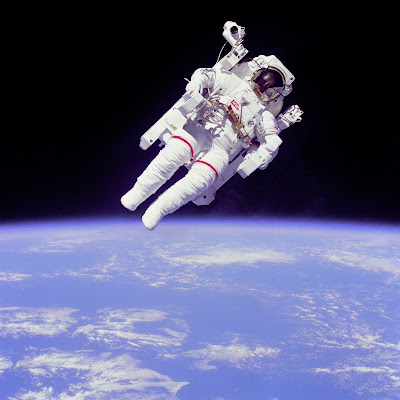
DIGITAL IMAGING AND VISUALISATION - EXERCISES Lecture/ Tutorial 7:  Introduction to Adobe After Effects October 9, 2017 - October 23, 2017 - Week 7 - Week 8 Jesslyn Fabryando - 0332213 Digital Imaging & Visualisation Introduction to Adobe After Effects (Exercises) Lecture 7:  Introduction Adobe After Effects On week seven learning digital imaging and visualization, the lecturer introduced us to another software which is Adobe After effects. We create animation in Adobe After Effects which is easier than animating it in Adobe Photoshop. Practical 7:  Introduction Adobe After Effects We were asked to download an image of an astronaut and a galaxy as the background. Our task is to move the astronaut. It's either left or right, up or down, rotate, zoom in and zoom out. We also learnt familiarizing the tools. One of the tool is the pen tool where we used it to crop the image that is unwanted. Fig. 1. Image of an astronaut Fig. 2. Image of...

Week 6 (Exercises) - Introduction to further different tools

Image
DIGITAL IMAGING AND VISUALISATION - EXERCISES Lecture/ Tutorial 6:  Introduction to burn, dodge, gradient, match color, noise, high pass October 2, 2017 - Week 6 Jesslyn Fabryando - 0332213 Digital Imaging & Visualisation Introduction to Different tools Lecture 6:  Introduction to burn, dodge, gradient, match color, noise, high pass On week six learning digital imaging and visualization, the lecturer introduced us to different kind of tools such as burn, dodge, gradient, match color, noise, and high pass. These will create a different outcome of the image. Practical 6:  Introduction to burn, dodge, gradient, match color, noise, high pass First Exercises: All of the images are provided by our lecturer. Our task is to manipulate the images and figure it out so that the images will look nice when we look at it where we will see there will be nothing wrong in the picture and will not look as if they were edited. Fig. 1. Old house Fig. 1.1....